
Apple Watch for kids is becoming an increasingly attractive idea for parents. If you are considering an Apple Watch instead of an iPhone for your child, here is what you should know first.
Event Context
An Apple Watch can provide the parts of a phone that parents usually want: calls, messages, location sharing, and a way to reach a child away from home. At the same time, it avoids much of what makes giving a young child an iPhone so complicated.
There is no camera, no full Safari browser, and none of the immersive social media, video, and gaming experience that comes with a smartphone. It is still a connected device, but one that can be easier for parents to manage and harder for kids to disappear into for hours.
Apple supports a feature it calls Apple Watch For Your Kids. It was previously known as Family Setup.
It lets a parent use their iPhone to set up and manage a cellular Apple Watch for a child who does not have an iPhone. Each child gets their own Apple Account and phone number, while the parent controls key settings through Family Sharing, the Watch app, and Screen Time.
A family-managed Apple Watch can give a child access to:
The parent can also manage communication limits, content and privacy restrictions, purchases, contacts, and Schooltime from their iPhone. Apple is expanding its child-safety and parental-control tools in iOS 27 as well.
The child does not need an iPhone. The parent or guardian does need a compatible iPhone for the initial setup and ongoing management.
It depends on what problem you are trying to solve.
If your child wants TikTok, YouTube, a camera, mobile games, and group chats across multiple social networks, an Apple Watch will not feel like an iPhone replacement. That is exactly why it can work so well as a first connected device.
Kids can call or message trusted people, tell a parent that practice ended early, and share their location while walking home. Parents gain useful communication and safety tools without putting the entire smartphone experience in a child’s pocket.
Apple Watch is not distraction-free. It has apps, notifications, games, music, and messaging. But its small screen and limited app library naturally discourage the long sessions that phones are designed to capture.
For many families, that makes it a useful middle ground between no device and a full iPhone.
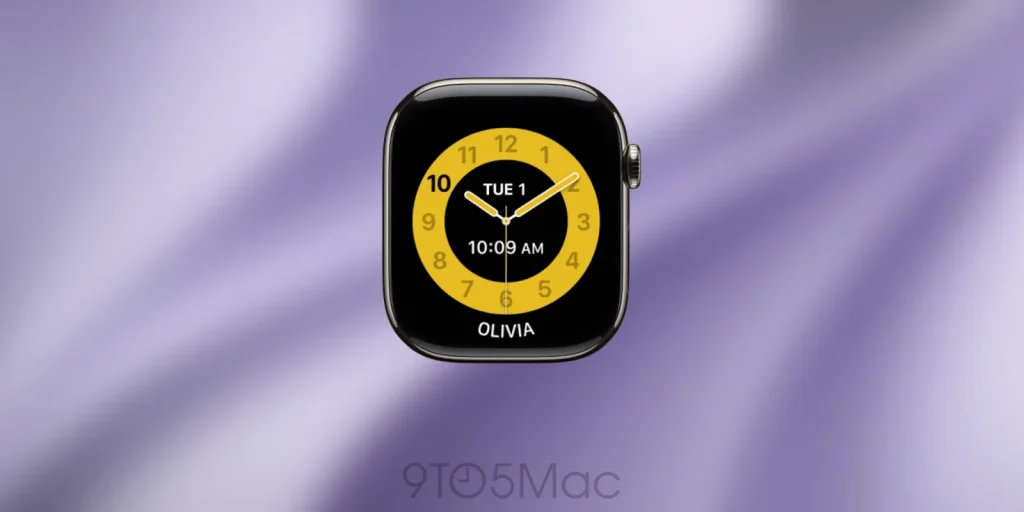
Apple includes a feature specifically designed for classroom use. Schooltime blocks notifications, disables apps, turns on Do Not Disturb, and replaces the normal watch face with one showing a distinctive yellow circle.
Parents can schedule Schooltime for specific days and hours from their iPhone. The child can temporarily exit it to check a message or make a call, but the parent receives a notification and can review when it was unlocked and for how long. During scheduled hours, Schooltime returns when the display goes back to sleep.
That is a meaningful restriction, but it does not overrule school policy.
Some schools prohibit smartphones while allowing smartwatches in a restricted mode. Others ban all connected personal devices, including Apple Watch. Before buying one for classroom use, check the school or district’s exact rules.
Schooltime makes Apple Watch less distracting. It does not make a prohibited smartwatch permissible.
Apple Watch For Your Kids requires:
A cellular service plan is not required to complete the basic family setup, but it is needed for the watch to stay independently connected away from known Wi-Fi networks. Without active cellular service, the most useful reason to give a child the watch disappears.
For most families, the best model is the 40mm Apple Watch SE 3 with GPS + Cellular.
The cellular version starts at $299 from Apple. You can find it refurbished for under $200, and Amazon sometimes has certain colors for around $269.
It is the smallest and least expensive current Apple Watch that supports independent connectivity, and Apple features it prominently in its own Apple Watch For Your Kids marketing.
Standalone smartwatch service commonly costs around $10 to $15 per month before taxes and fees.
Team Analysis
The 40mm case is also better suited to smaller wrists than the 44mm model. Apple recommends the Sport Band, Sport Loop, and Solo Loop for children, although fit varies considerably by wrist size.
More importantly, buying the current SE gives you a much longer likely software-support runway than an inexpensive older watch. Apple has announced that watchOS 27 will support Apple Watch SE 3, Series 9, Series 10, Series 11, Ultra 2, and Ultra 3.
That makes the SE 3 the easy default recommendation if you are buying new.
A used cellular Apple Watch can lower the upfront cost, but the cheapest model is rarely the best value.
If you find one at a significant discount, a 41mm Apple Watch Series 9 with cellular is the strongest current used alternative. It remains on Apple’s watchOS 27 compatibility list and has a smaller case option.
An Apple Watch SE 2 or cellular Series 6, Series 7, or Series 8 can still work as a hand-me-down under current software. These are reasonable choices if your family already owns one and its battery remains healthy.
I would be more cautious about buying one now. Apple’s announced watchOS 27 compatibility list drops all of those models, making their remaining software life less certain.
When shopping used, verify all of the following:
The battery deserves special attention. A cheap watch that cannot make it through the school day is not much of a bargain.
Avoid Apple Watch Series 3 entirely. Apple sold this model for many years, so there are a lot of them out there. It’s name is also a bit too similar to Apple Watch SE 3, which is the one to buy.
Even cellular versions of the old Series 3 do not support Apple Watch For Your Kids and require the wearer to have their own iPhone.
I would also avoid buying Series 4 and Series 5 models for this purpose. They may appear tempting on the used market, but their age, obsolete software, and likely battery wear make them poor purchases for a device a child may need to rely on.
The distinction is important:
The hardware price is only part of the cost. Independent calls, messages, and location updates, especially away from Wi-Fi, generally require a compatible cellular plan.
It is also worth considering a protective case, a child-sized replacement band, and AppleCare+.
Apple Watch is not a loophole for every smartphone ban, and it is not a distraction-free device. Some schools prohibit it, cellular service adds an ongoing cost, and family-managed watches have feature limitations.
Still, it can be one of the best ways to give a child more independence without handing over an iPhone.
For most families buying today, the 40mm Apple Watch SE 3 with GPS + Cellular is the model to get. It delivers calls, messages, location sharing, Schooltime, and emergency access in the least expensive current package, with a better software future than the older watches filling refurbished listings.
That is the appeal: most of the connection parents want, without most of the smartphone experience they are not ready to give their child.
Do more with your Apple products
Apple AirTag 2 | Add Find My tracking to keys, bags, bikes, more
AirPods 4 | Apple’s newest wireless headphones
AirPods Pro 3 | Apple’s best wireless headphones
Beats USB-A to USB-C Cable | The official CarPlay cable
Wireless CarPlay Adapter | No more plugging in required
Withings Body Comp | Best smart scale for Apple Health
